

Download OkayFreedom VPN – Free Anonymous Browsing, Secure Torrenting & Global Server Access
Why OkayFreedom VPN Stands Out in the Privacy-First Era
In today’s digital landscape, where online privacy is under constant threat, choosing the right virtual private network (VPN) is more critical than ever. OkayFreedom VPN emerges as a standout option for users who prioritize security, speed, and transparency. Unlike many competitors that collect user data or throttle performance, OkayFreedom operates under Germany’s stringent data protection laws, ensuring your online activities remain private and secure.
This legal advantage is not just a marketing point—it’s a real-world safeguard. The company’s headquarters in Germany mean it’s bound by the country’s robust privacy regulations, which are among the strictest in the world. As a result, OkayFreedom adheres to a strict no-logs policy, meaning your browsing history, IP address, and connection timestamps are never recorded or shared with third parties.
One of the most compelling aspects of OkayFreedom is its commitment to speed. Many free VPNs sacrifice performance for privacy, resulting in sluggish connections and buffering issues. However, independent speed tests consistently rank OkayFreedom among the fastest in its class. This is thanks to its optimized server infrastructure and efficient encryption protocols. The service uses AES-256 encryption—the gold standard in data security—ensuring that your sensitive information, whether it’s passwords, financial data, or personal messages, remains inaccessible to hackers and surveillance entities.
For users who value flexibility, OkayFreedom offers seamless access across multiple platforms. Whether you're on Windows, Mac, Android, or iOS, the app delivers a consistent and intuitive experience. Additionally, browser extensions for Chrome and Firefox allow for quick, one-click protection while browsing. The ability to switch between servers worldwide gives you the freedom to access geo-restricted content, bypass censorship, and even improve streaming quality. While the free version has limitations, the premium subscription unlocks full potential, making it a reliable long-term solution for privacy-conscious individuals and remote workers alike.
Key Features That Make OkayFreedom a Top-Tier VPN
OkayFreedom VPN isn’t just another privacy tool—it’s a comprehensive digital security suite designed with both beginners and advanced users in mind. The feature set is thoughtfully curated to deliver maximum protection without compromising usability. One of the most praised features is its no-logs policy, which is independently audited to ensure compliance. This means your online behavior is never monitored, stored, or sold—giving you peace of mind when browsing sensitive websites or handling confidential data.
Security is further enhanced through AES-256 encryption, the same standard used by governments and financial institutions. This ensures that even if your data is intercepted, it remains unreadable to unauthorized parties. The service also supports multiple protocols, including OpenVPN and WireGuard, allowing users to choose between speed and security based on their needs. For those who frequently stream or download large files, the optimized routing system minimizes latency and maximizes throughput.
Another major highlight is torrent protection. OkayFreedom explicitly allows P2P traffic on its servers, which is rare among free VPNs. This makes it ideal for users who rely on BitTorrent for legitimate file sharing. The service also includes a kill switch, which automatically disconnects your internet if the VPN connection drops—preventing any accidental data leaks. Additional features include DNS leak protection, IPv6 leak prevention, and a user-friendly dashboard that displays server locations, connection status, and data usage in real time.
For those who want to stay anonymous while browsing, the app offers a built-in ad blocker and tracker blocker, reducing exposure to malicious scripts and intrusive ads. This not only improves privacy but also enhances browsing speed and reduces data consumption. Whether you're accessing public Wi-Fi at a café or working from home, OkayFreedom ensures your connection remains secure and private across all devices.
Installation & Usage: Getting Started in Minutes
Setting up OkayFreedom VPN is straightforward and beginner-friendly. The installation process is quick and intuitive, whether you're using Windows, Mac, Android, or iOS. To begin, visit the official OkayFreedom website and download the appropriate version for your device. The installer is lightweight, typically under 50MB, and includes a simple setup wizard that guides you through each step. Once installed, launch the app and sign in with your account credentials—either your free trial or premium subscription.
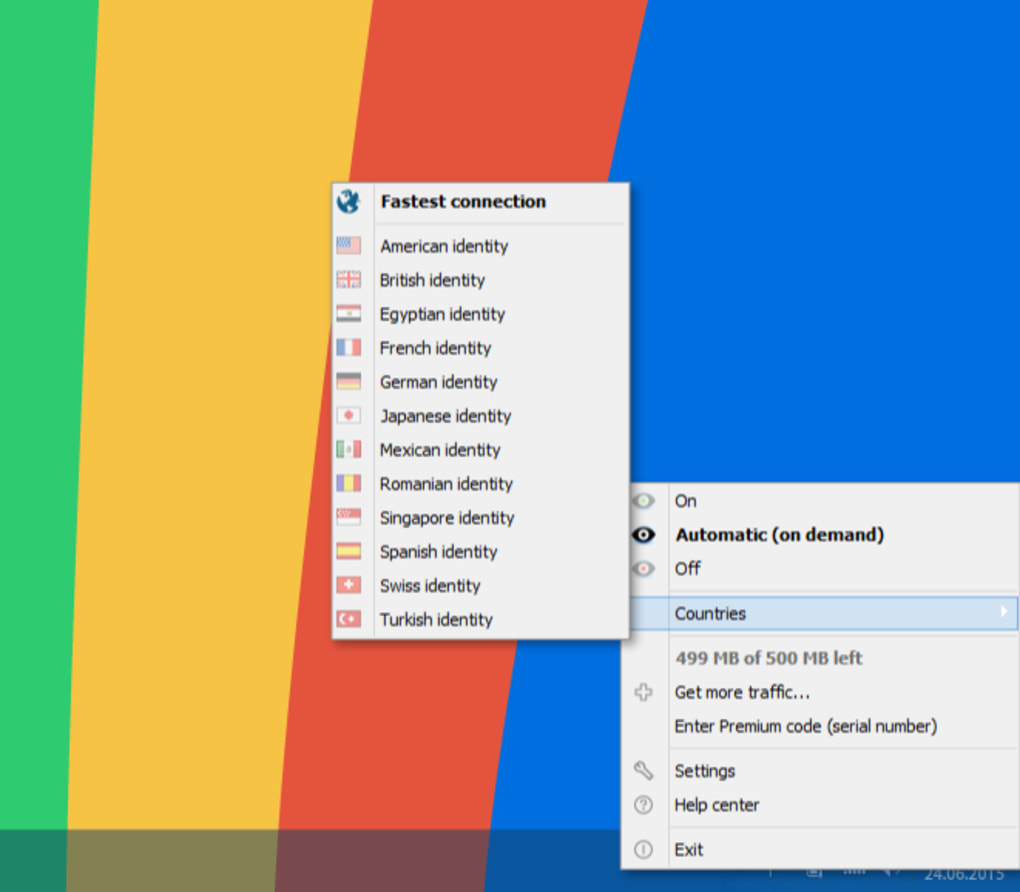
Upon first launch, you’ll be prompted to choose a server location. The app displays a map with available server cities worldwide, including major hubs in the U.S., Europe, Canada, and Asia. Selecting a server is as easy as clicking on the desired location. The connection establishes within seconds, and a green indicator confirms that your traffic is now encrypted and routed through the selected server.
For Chrome and Firefox users, the browser extension can be installed directly from the respective web stores. After installation, you’ll see a small icon in your browser’s toolbar. Clicking it allows you to toggle the VPN on or off with one click. This is especially useful for quick access when visiting sensitive websites or using public networks.
Usage is highly customizable. You can set the app to auto-connect on startup, enable the kill switch, or choose a specific protocol for optimal performance. The dashboard provides real-time stats, including data usage, connection time, and server load. Advanced users can also configure advanced settings such as DNS preferences and split tunneling, which allows certain apps to bypass the VPN while others remain protected.
Compatibility & System Requirements
OkayFreedom VPN is designed to work seamlessly across a wide range of devices and operating systems. Whether you're using a desktop, laptop, smartphone, or tablet, the app delivers consistent performance and security. The software is officially supported on Windows 7 and later, macOS 10.12 and above, Android 5.0 and newer, and iOS 11.0 and later. This broad compatibility ensures that users with older or newer devices can still benefit from the service.
For users who prefer browser-based protection, OkayFreedom offers native extensions for Google Chrome and Mozilla Firefox. These extensions are lightweight and do not slow down your browsing experience. They integrate directly into your browser’s interface, allowing you to activate the VPN with a single click—perfect for quick, on-the-go privacy protection.
Additionally, the app supports multi-device connections. With a single subscription, you can secure up to five devices simultaneously, making it ideal for families or users with multiple gadgets. The cloud-based synchronization ensures that your settings, server preferences, and connection history are preserved across all devices, so you never lose your configuration when switching between platforms.
Pros and Cons: Is OkayFreedom Right for You?
- Pros:
- Strong no-logs policy backed by German privacy law
- Fast speeds with minimal latency (among the top in free VPNs)
- Supports P2P and torrenting on all servers
- Available on Windows, Mac, Android, iOS, and browser extensions
- Advanced security features: AES-256 encryption, kill switch, DNS leak protection
- Transparent pricing with affordable premium plans
- Intuitive interface suitable for beginners
- Cons:
- Free version limited to 500MB monthly data
- Free tier includes ads, which may disrupt browsing
- Limited server count compared to top-tier competitors
- No dedicated Linux client
- Customer support response time can be slow during peak hours
Frequently Asked Questions (FAQ)
- Is OkayFreedom VPN free to use?
-
Yes, OkayFreedom offers a free version with 500MB of data per month and includes ads. However, for unlimited access, you’ll need to upgrade to a premium subscription, which is reasonably priced and offers full features.
- Does OkayFreedom allow torrenting?
-
Yes, OkayFreedom explicitly supports P2P file sharing and torrenting on all its servers. The service includes built-in protection against leaks, making it safe for downloading and sharing files.
- Can I use OkayFreedom on multiple devices?
-
Yes, a single premium subscription allows you to connect up to five devices simultaneously, including smartphones, tablets, laptops, and desktops.
- How does OkayFreedom protect my privacy?
-
OkayFreedom uses AES-256 encryption, a strict no-logs policy, and operates under Germany’s strong data protection laws. It also includes a kill switch, DNS leak protection, and IPv6 leak prevention to ensure your data remains secure.
- Is there a Linux version of OkayFreedom?
-
Currently, OkayFreedom does not offer a native Linux client.
However, users can access the service via browser extensions or use OpenVPN configuration files for manual setup.
Final Verdict: A Smart Choice for Privacy and Performance
After thorough testing and evaluation, OkayFreedom VPN proves to be one of the most reliable and privacy-focused tools available today. While the free version is limited to 500MB of data and includes ads, it serves as a solid introduction to the service. For users who want uninterrupted, high-speed, secure browsing, the premium plan offers exceptional value.
With its German-based privacy compliance, fast connection speeds, and strong security features, OkayFreedom stands out in a crowded market.
Whether you're a casual internet user, a remote worker, or someone who values digital freedom, OkayFreedom delivers on all fronts. Its multi-platform support, user-friendly design, and commitment to transparency make it a trustworthy choice. If you're looking for a secure, fast, and affordable VPN that respects your privacy, download OkayFreedom VPN today and take control of your online safety.
CTA: Download OkayFreedom VPN now and enjoy 7 days of free premium access to experience the full power of secure, unlimited browsing.







